Showing posts with label NAV 2009R2. Show all posts

Monday, July 13, 2015

Page N of M

Hi,
In NAV2013R2, It is easy to print page no. like "1 of 10" but in NAV2009, It is a logical because there is no any function to find out total page no. I have also never done this task in classic view but I tried to solve this query because it was a new for me and asked by one of my colleague. Now I am going to write down the step by step procedure to implement it.

1) Create the new Form named "Page N of M" FROM Customer table.


2) Form Design view will look like this...


3) Add the following global variables...
 Name DataType Subtype Length
Txt000 Text 100
CountRec Integer
r Decimal
q Integer
Flag Integer

4) Write the following code on "OnInit Report"....

MESSAGE('%1',Customer.COUNT);

                   Txt000 := ' of ';

5) Write the following code on "OnPreSection" of Customer body....

CountRec += 1;


6) Write the following code on "OnPreSection" of Customer Footer....

                               Flag +=1;
                                IF Flag=1 THEN BEGIN
                                   MESSAGE('%1',CountRec);
                                   r := COUNT MOD CountRec;
                                   q := COUNT DIV CountRec;
                                   IF r > 0 THEN
                                   q := q+1;
                                   Txt000 := Txt000 + FORMAT(q);

                                 END;


7) Now save and close the form and run.


You can also find the object from this link

Thanks
Niraj Kumar

http://niraj-msnav.blogspot.com
http://nirajdynamicsnav.wordpress.com


Thursday, May 28, 2015

Obtaining Input Without Form


Hi,

Sometimes you don't want to use an entire form to get user input. In this case, we use dialog box window before opening the main form to give input and according to given input we can open form. As we know dialog boxes are not a substitute for forms, but they work just fine for quick input to our form.

Now I am going to implement a simple form as our requirement that open a window before opening the main form to take input.

1) Create a new form named "Input Window Before Main Form" and select some fields according to you. You can also use another name.

2) Form Designer look like this...


3) Add the following global variables...
Name DataType Subtype Length
Window Dialog
DocumentType Option
DocumentNo Code 20

Note: Remember that "DocumentType" is an option datatype. So use the correct option. Select the DocumentType and press "SHIFT+F4" to go to its properties and under the "OptionString" properties write the correct value.

4) Add the Text Constants...
Name ConstValue
Text001 Document Type: #1############# \Document No.:  #2#############

5) Now write the following code to the "OnOpenForm" trigger of the form...
Window.OPEN(Text001);
Window.INPUT(1,DocumentType);
Window.INPUT(2,DocumentNo);
Window.CLOSE;

SETRANGE("Document Type",DocumentType);
SETRANGE("No.",DocumentNo);

6) Now save and close the form and run. When you run your form then "Input Window" will open first.


7) After giving the input press Enter or click Cancel to exit.


Thanks & Regards
Niraj Kumar

http://niraj-msnav.blogspot.com
http://nirajdynamicsnav.wordpress.com


Friday, May 22, 2015

Create Multiple copies of Report in nav2009r2

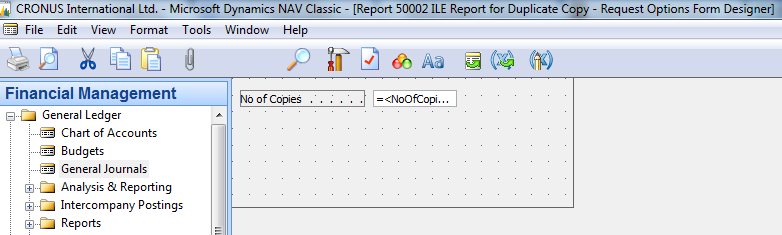
Sometimes there is a need to print the multiple copies of Report in navision 2009R2. To do this there is very simple way. Now I am going to create a report to print a multiple copies of report in very simple way. I am going to create a simple ILE report to print multiple copies.
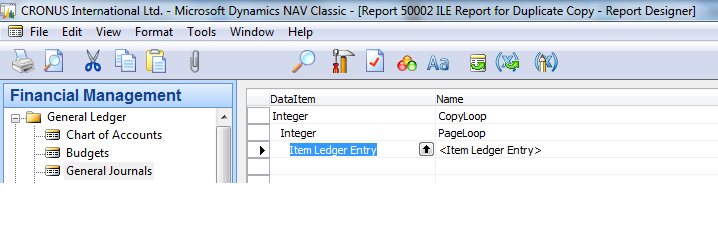
1) Create new report in given format
Untitled
2) Set first "Integer" dataitem properties "DataItemTableView" as SORTING(Number) and "NewPagePerRecord" as Yes.
3) Set second "Integer" dataitem properties "DataItemTableView" as SORTING(Number) WHERE(Number=CONST(1)).
4) Set third "ILE" dataitem properties "DataItemTableView" as SORTING(Entry No.).
5) Now write the code on CopyLoop - OnPreDataItem()
IF NoOfCopies >= 3 THEN
ERROR(Text003);
NoOfLoops := ABS(NoOfCopies) + 1;
IF NoOfLoops <= 0 THEN
NoOfLoops := 1;
CopyText := '';
SETRANGE(Number,1,NoOfLoops);

6) Now write the code on CopyLoop - OnAfterGetRecord()
IF Number >= 2 THEN BEGIN
CopyText := Text001
END;
IF Number >= 3 THEN BEGIN
CopyText := Text004;
END;
CurrReport.PAGENO := 1;
7) Leave the second "Integer" dataitem. There is no need to write any code on this dataitem.
8) Write the code on ILE dataitem as you want to filter the data or leave blank.
9)
keep your variables as i wrote
Name DataType Subtype Length
NoOfCopies Integer
NoOfLoops Integer
CopyText Text 30
Name ConstValue
Text001 Duplicate
Text002 Sales Invoice
Text003 More than two(2) copies are not permitted....
Text004 Triplicate
10) Section part is look like this
Untitled
Untitled
11) Now run the report

Untitled

Untitled